
Cisco Software Activation Document for HP


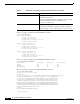
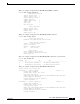
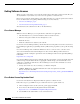
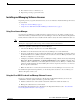

7
Cisco Software Activation Document for HP
OL-12769-01
Software Activation
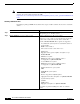
4. The software license is e-mailed to you.
5. Repeat Step 1 to Step 3 get more licenses.
Installing and Managing Software Licenses
Depending on how you get the software licenses, use one of methods to install and manage the licenses
on your switch:
• Using Cisco License Manager, page 7
• Using the Cisco IOS CLI to Install and Manage Software Licenses, page 7
Using Cisco License Manager
Use Cisco License Manager to install and manage software licenses on the switch, regardless of the
method from which you obtain them (Cisco License Manager or the Cisco Product License Registration
Portal). After the software license is installed and the switch restarts, the switch enables the feature set.
Note The Cisco License Manager documentation refers to SSL-enabled devices that are the same as switches
running the cryptographic software image in the Catalyst switch documentation.
Follow these guidelines when using Cisco License Manager:
• Cisco License Manager only runs on a server with Windows XP.
• Firewalls are not allowed between the Cisco License Manager server and a GUI client.
• For device notification to be successful, ensure that the Cisco License Manager hostname exists in
the Domain Name Service (DNS) or that the device has the Cisco License Manager hostname and
IP address configured to receive messages.
• Configure your switch to allow Cisco License Manager to manage software licenses by using the ip
http server, license agent listener, and ip http authentication privileged EXEC commands. For a
summary of these commands, see the Getting Started with Cisco License Manager on Windows XP
guide. For detailed instructions about enabling Cisco License Agent on your device, see the Cisco
License Agent documentation.
• Make sure that there is a valid connection from the Cisco License Manager server to Cisco.com.
For additional requirements and guidelines, see the Getting Started with Cisco License Manager for
Windows XP guide on Cisco.com.
Using the Cisco IOS CLI to Install and Manage Software Licenses
If you get a software license from the Cisco Product License Registration Portal, you can use the
command-line interface (CLI) commands to perform these tasks:
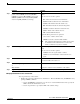
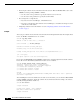
1. Install a software license and restart the switch. The switch then enables the feature set.
2. Manage the software licenses on the switch.
For information about using the Cisco Product License Registration Portal. see the “Cisco Product
License Registration Portal” section on page 6.