
Cisco Software Activation Document for HP



3
Cisco Software Activation Document for HP
OL-12769-01
Software Activation
The software license is node-locked because the software license is bound to the unique device identifier
(UDI) of the switch and can only be used on that switch.
If more than one software license is installed on the switch, it uses this hierarchy to determine the first
software license to locate in the flash memory and install:
1. Advanced IP services
2. IP services
3. IP base
If all three licenses are installed on the switch, the switch uses the highest license level, the advanced IP
services feature set. If you want to run the IP base feature set, remove the IP services and advanced IP
services licenses from the switch.
To display software license information, see the “Displaying Software License Information” section on
page 3.
To get a software license, use Cisco License Manager or the Cisco Product License Registration Portal.
For more information, see the “Getting Software Licenses” section on page 6.
To install and manage software licenses, you can use Cisco License Manager or the command-line
interface (CLI). For more information, see “Installing and Managing Software Licenses” section on
page 7
Displaying Software License Information
To display information about the software licenses on your switch, use one of these methods:
• Use Cisco License Manager to view license and device information. In the GUI, the discovery and
polling features collect all the license and device information that appears in the Properties window.
For detailed instructions, see the Cisco License Manager online help.
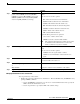
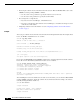
• Use the Cisco IOS privileged EXEC commands in Table 2.
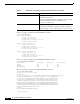
Table 2 Commands for Displaying Software License Information
Command Description
show boot Displays the settings of the boot environment variables.
For information about this command, including examples of
command output, see the command reference on Cisco.com.
show license agent {counters |
session}
Displays the information about the software license agent.
For information about the show license agent privileged
EXEC command, see the Cisco IOS Software Licensing
feature module at this URL:
http://www.cisco.com/en/US/products/sw/iosswrel/ps5012/prod
ucts_feature_guide09186a00807afa10.html
show license [all [switch switch-num]
| detail [feature-name | switch switch-
num] | feature [switch switch-num] |
file [switch switch-num] | statistics
[switch switch-num] | status [switch
switch-num] | udi [switch
switch-num]]
Displays information about the software license.
For information about the show license privileged EXEC
command, see the Cisco IOS Software Licensing feature
module at this URL:
http://www.cisco.com/en/US/products/sw/iosswrel/ps5012/prod
ucts_feature_guide09186a00807afa10.html