
Quick Start Manual





16 G e t ti n g S t ar te d
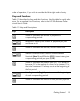
:[
Stores the number of payments or compounding periods
per year.
F
Stores or calculates the future value (FV), a final cash flow.
FV always occurs at the end of the last compounding
period.
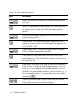
:]
Sets End mode (End). Payments occur at the end of each
compounding period.
A
Amortization. The Amortization menu calculations are
based on values stored in the following TVM registers: N,
I/R, PV, PMT, P/YR.
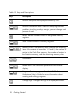
:\
Depreciation menu. Calculate the depreciation of assets
with six different depreciation models.
C
Cash Flow list. Enter cash flows into the list as a set of
numbered pairs, CF(n) and #CF(n), where n is the index of
the cash flow list.
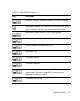
:y
Data menu. Enter and store data for statistical operations.
Enter a list of x values for one-variable statistics, a list of
pairs, (x, F) for weighted, one-variable statistics, a list of
numbers x for one-variable statistics, or a list of pairs, (x, y)
for two-variable statistics. To enter data, key in a number
and press
I.
PR
Opens the Internal Rate of Return (IRR) and Net Present
Value (NPV) menus for cash flow analysis.
Table 1-3 Keys and Descriptions
Keys Description