
Programming instructions

Business Problems
63
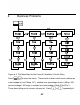
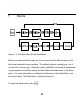
scroll to the item you require. Press I with a menu item displayed to
access its-sub menu. To enter data in the sub-menus, select the appropriate
menu item, key in the number, and press I. Press > or < to select
the menu item you need solved and press = to calculate it.
To return to the menu items from within a sub-menu, press O.
Note: for business problems using 20b, margin is based on price; markup is based
on cost.
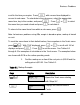
To reset the menu items to their default values, from anywhere in the %calc menu
press :x. With
TVM
displayed, press > or < to scroll until
%Calc
displays and press I. Press O to exit the menu. See Tables 6-1
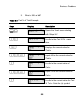
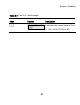
through 6-3 for examples of calculations in the %calc menu. The examples below
are shown with RPN as the active operating mode.
1. Find the markup on an item if the cost price is $15.00 and the
selling price is $22.00. See Table 6-1.
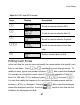
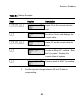
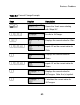
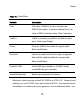
Table 6-1 Markup Example
Keys Display Description
:#
Opens the %calc menu starting
with
Mkup.%C.
I
Displays the current value of
Cost=
.