
System information
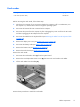
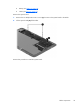

System board
NOTE: The system board spare part kits include replacement thermal material.
Description Spare part number
System board for use with non-Windows 8 models with an Intel Core i5-3339Y processor (includes
processor and replacement thermal material)
732295-001
System board for use with Windows 8 Standard models with an Intel Core i5-3339Y processor
(includes processor and replacement thermal material)
732295-501
System board for use with non-Windows 8 models with an Intel Core i3-3229Y processor (includes
processor and replacement thermal material)
732296-001
System board for use with Windows 8 Standard models with an Intel Core i3-3229Y processor
(includes processor and replacement thermal material)
732296-501
Before removing the system board, follow these steps:
1. Shut down the computer. If you are unsure whether the computer is off or in Hibernation, turn
the computer on, and then shut it down through the operating system.
2. Disconnect all external devices connected to the computer.
3. Disconnect the power from the computer by first unplugging the power cord from the AC outlet
and then unplugging the AC adapter from the computer.
4. Disconnect the tablet from the keyboard dock (see
Releasing the tablet from the keyboard dock
on page 34).
5. Remove the following components:
●
Display rear cover (see
Display rear cover on page 49)
●
Fan (see
Fan on page 52)
●
Heat sink (see
Heat sink on page 53)
●
WLAN module (see
WLAN/Bluetooth combo card on page 55)
●
Display cable (see
Display cable on page 60)
●
Touchscreen board cable (see
Touchscreen board on page 62)
●
Volume board cable (see
Volume board on page 63)
●
Bottom trim (see
Bottom trim on page 65)
●
Audio board (see
Audio board on page 68)
●
Card reader cable (see
Card reader on page 71)
●
Speakers (see
Speakers on page 72)
78 Chapter 5 Removal and replacement procedures for Authorized Service Provider parts