
System information

●
Bottom trim (see
Bottom trim on page 65)
●
Audio board (see
Audio board on page 68)
●
Card reader cable (see
Card reader on page 71)
●
Speakers (see
Speakers on page 72)
●
Battery (see
Battery on page 73)
●
Frame (see
Frame on page 75)
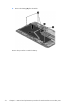
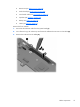
Remove the front webcam:
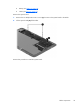
1. Disconnect the webcam cable from the system board (1).
2. Use a flat tool to pry the webcam up and loosen the adhesive that secures it to the tablet (2).
3. Remove the webcam from the tablet (3).
Tablet components
77