
System information
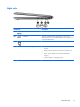
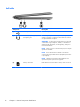

Component Description
(7)
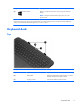
Windows button Returns you to the Start screen from an open app or the Windows
desktop.
NOTE: Pressing the Windows button again returns you to the
previous screen.
*The antennas are not visible from the outside of the computer. For optimal transmission, keep the areas immediately around
the antennas and proximity sensors free from obstructions. For wireless regulatory notices, see the section of the Regulatory,
Safety, and Environmental Notices that applies to your country or region.
Keyboard dock
Top
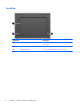
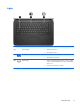
Component Description
(1) Alignment posts Align and attach the tablet to the keyboard dock.
(2) Release latch Releases the tablet from the keyboard dock. To release
the tablet, slide the release latch to the left.
(3) Docking connector Connects the tablet to the keyboard dock.
Keyboard dock
11