System information
Manuals
Brands
HP Manuals
Computers
100B - All-in-One PC
51
52
53
54
55
56
57
58
59
60
3.
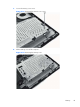
Loosen the memory cover screw.
Figure 6-18
Removing the memory cover screw
4.
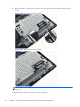
Lift the memory cover off the computer.
Figure 6-19
Removing the memory cover
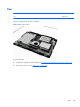
Memory
43
1
...
...
49
50
51
52
53
...
...
104