
Service and Maintain



To remove the WLAN module antenna and cable:
1. Prepare the computer for disassembly (see
Preparing to Disassemble the Computer
on page 26).
2. Remove the rear cover (see
Rear Cover on page 27).
3. Remove the system board shield (see
System Board Shield on page 63).
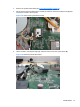
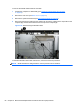
4. Disconnect the antenna cable from the module (1), remove the cable from the clips built into the
computer (2), and then lift the antenna from the top of the computer (3).
Figure 6-53 Disconnecting the WLAN module
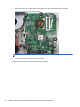
To install the WLAN module cable and antenna, reverse the removal procedures.
NOTE: WLAN modules are designed with a notch to prevent incorrect insertion.
68 Chapter 6 Removal and Replacement Procedures All-in One (AIO) Chassis