
Service and Maintain



Stand
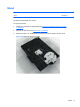
Description Spare part number
Stand 646783-001
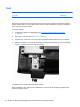
The stand is secured with four screws.
To remove the stand:
1. Prepare the computer for disassembly (see
Preparing to Disassemble the Computer
on page 26).
2. Remove the rear cover (see
Rear Cover on page 27).
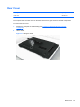
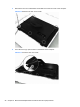
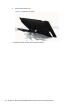
3. Remove the four Torx T15M4.0x8.0 screws that secure the stand to the rear cover.
Figure 6-6 Removing the stand screws
Stand 31