User guide
Manuals
Brands
HP Manuals
Computers
10-f005au
31
32
33
34
35
36
37
38
39
40
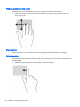
Tapping
To make an o
n-screen selection, use the ta
p function on th
e Tou
chPad.
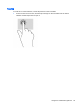
●
Point to an item on the scre
en, and then tap one fin
ger on the
TouchPad
zone to
make a
selection. Dou
ble-tap an item
to open
it.
Using the Touc
hPad and gestures
25
1
...
...
31
32
33
34
35
...
...
65