
user manual






HP PSC 500 Setup Guide
1-3
5
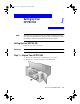
Remove the packaging materials (plastic wrap, cardboard insert, and
packing tape) from the outside of the unit.
Step 2 — Load Paper in Your HP PSC 500
1
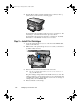
Slide the paper width and length adjusters to their outermost positions.
As you pull the paper length adjuster out, the bottom (IN) tray also slides
out.
2
Insert paper into the IN tray, print side down, until it stops.
3
Slide the paper width and length adjusters in until they stop at the edges
of the paper.
WLSG.book Page 3 Thursday, March 9, 2000 2:26 PM