
user manual






HP PSC 500 Setup Guide
1-1
Setting Up Your
HP PSC 500
1
NOTE
If available, your scanner works best with your computer’s parallel port set to ECP
mode. Refer to the “Read about ECP” document, which is available after you install
your software or refer to the user’s guide that came with your computer.
Setting Up Your HP PSC 500
Follow the steps in the order shown.
IMPORTANT
Do not turn on your HP PSC 500 until the installation program instructs you
.
Step 1 — Unpack Your HP PSC 500
1
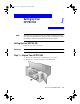
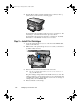
Remove the cardboard tray containing the accessory items.
2
Rest the box on its side, and pull out your HP PSC 500.
WLSG.book Page 1 Thursday, March 9, 2000 2:26 PM