
user manual
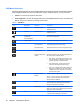




Table Of Contents
- Product Features
- Safety and Maintenance Guidelines
- Setting Up the Monitor
- Unfolding the Double-Hinged Monitor Pedestal Base
- Unfolding the Single-Hinged Monitor Pedestal Base
- Rear Components
- Cable Management
- Connecting the Cables
- Adjusting the Monitor
- Turning on the Monitor
- Connecting USB Devices
- Using the Accessory Rails
- Removing the Monitor Pedestal Base
- Locating the Rating Labels
- Operating the Monitor
- Troubleshooting
- Technical Specifications
- Agency Regulatory Notices
- LCD Monitor Quality and Pixel Policy

Icon Main Menu Submenu Description
Disable/Enable Auto-
Switching
Enables or disables the system's automatic video
signal input-switching feature. The factory default is
enabled.
Default Video Input Selects the default or primary video input signal when
the monitor is connected to two active and valid video
sources. The monitor will automatically determine the
video format. The default input selection is DVI.
Analog — VGA — Selects VGA input.
Digital — DVI — Selects DVI input.
Information Selects and displays important information about the
monitor.
Current Settings Provides the current input video mode.
Recommended
Settings
Provides the recommended resolution mode and
refresh rate for the monitor.
Serial Number Reports the serial number of the monitor. The serial
number is needed if contacting HP technical support.
Version Reports the firmware version of the monitor.
Backlight Hours Reports the total hours of backlight operation.
Service Support: http://
www.hp.com/support
Factory Reset Returns all OSD menu settings and DDC/CI controls
to the factory default settings, except the Language.
Exit Exits the OSD menu screen.
Table 4-2 OSD Menu (continued)
Adjusting the Monitor Settings 29