
user manual




ENWW D Setting up the MFP 391
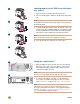
Loading media in tray 2 and tray 3
1 Pull the tray open until it stops (1). Load the standard-size
media so that the side to be printed on faces down, and the
top edge is toward the rear of the tray (2). Do not load more
media than the maximum that is indicated by the media-fill
triangles at the back of the tray.
Note
Never fan media before loading it.
2 Move the left media guide to match the media size that is
being loaded (3). Move the front media guide to match the
media size that is being loaded (4).
3 Set the custom/standard switch to STANDARD for standard-
size media. Slide the tray into the MFP.
Note
See the User Guide (in the front-door pocket of the MFP) for
instructions for loading tray 1.
2
3
1
1
2
3
4