
user manual



238 Cleaning procedures ENWW
Cleaning the post charger
Clean the post charger on the transfer belt if light streaks appear
in halftone areas of the printed pages.
1 Slide the 2,000-sheet side input tray (tray 4) away from the
MFP.
2 Open the right upper door.
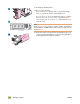
3 Locate the blue handle of the post charger cleaner on the
front left of the image transfer belt.
4 Gently slide the post charger cleaner to the right until it stops.
The spring should be compressed.
5 Slide the cleaner to the left back into place.
4
5
1
2
3