
user manual



98 Printing on special print media ENWW
Printing on envelopes
Note
Do not use envelopes that contain pressure-sensitive adhesive,
clasps, snaps, windows, coated linings, exposed self-stick
adhesives, or other synthetic materials.
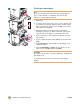
1 Open tray 1.
2 Load up to 10 envelopes in the center of tray 1, with the side
to be printed on facing up, and the postage end in the upper
right corner. Slide the envelopes into the MFP as far as they
will go without forcing them.
3 Adjust the guides to touch the envelope stack without
bending the envelopes (1). Make sure that the envelopes fit
under the tabs on the guides. Load envelopes into tray 1.
4 At the control panel, set the appropriate envelope size and
type for tray 1.
5 In your software program, click the File menu, and then click
Print.
6 Click Properties (this option might vary depending on your
software program).
7 On the Paper/Quality (or Paper) tab, specify tray 1 as the
paper source, click OK, and then click Print.
CAUTION
Do not print on both sides of envelopes. Damage to the MFP and
jams might result.
To avoid a jam, do not remove or insert an envelope during
printing.
1
2
3
1