user manual
Manuals
Brands
HP (Hewlett-Packard) Manuals
All in One Printer
HP Laserjet Pro 100 CE866A
41
42
43
44
45
46
47
48
49
50
2.
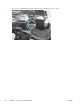
Release on tab (callout 1) by slightly rotating
the top of the cover (ca
llout 2) away from
the
product.
Figure 1-34
Remove the left-front cover
(2 of 2)
1
2
32
Chapter 1 Removal and replacement
ENWW
1
...
...
48
49
50
51
52
...
...
170