
user manual




Preboot menu options
If an error occurs while the product is initializing, an error message appears on the control-panel
display. The user can access the Preboot menus. The error menu item will not be seen if an error did
not occur.
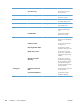
Table 3-51 Preboot menu options (1 of 5)
Menu option First level Second level Third level Description
Continue Selecting the Continue item exits the Preboot menu and
continues the normal boot process.
If a selection is not made in the initial menu within 30
seconds, the product returns to a normal boot (the same as
selecting Continue.
If the user navigates to another menu, the timeout does not
apply.
Sign In Enter the administrator PIN or service PIN if one is required
to access the Preboot menu.
514 Chapter 3 Solve problems ENWW