
user manual


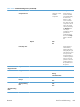

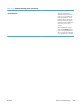
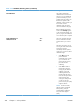


Table 3-30 Troubleshooting menu (continued)
First level Second level Third level Fourth level Values Description
Component Test Select from a list of
available
components.
Use this feature to
exercise individual
parts independently
to isolate noise,
leaking, or other
issues. To start the
test, select one of the
components. The test
will run the number
of times specified by
the Repeatoption.
You may be
prompted to remove
parts from the
product during the
test. Press the Stop
button to abort the
test.
Repeat Off*
On
Print/Stop Test Use this feature to
isolate faults by
stopping the printer
during the print cycle
and observing where
in the process the
image degrades. To
run the test, specify a
stop time. The next
job that is sent to the
product will stop at
the specified time in
the process.
Retrieve
Diagnostic Data
Export to USB
Diagnostic Files Device Data File
Debug
Information File*
Include Crash
Dumps
Off
On*
Cleanup Debug
Info
Off
On*
General Debug
Data
ENWW
Tools for troubleshooting
387