
user manual
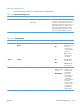
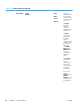
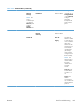
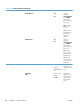
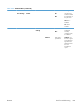
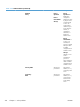


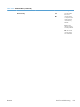
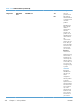

Table 3-29 Jetdirect Menu (continued)
First level Second level Third level Fourth level Fifth level Values Description
Proxy Server Select from a
provided list.
Specifies the
proxy server to be
used by
embedded
applications in the
product. A proxy
server is typically
used by network
clients for Internet
access. It caches
Web pages, and
provides a degree
of Internet
security, for those
clients.
To specify a proxy
server, enter its
IPv4 address or
fully-qualified
domain name.
The name can be
up to 255 octets.
For some
networks, you
might need to
contact your
Internet Service
Provider (ISP) for
the proxy server
address.
Proxy Port Default = 00080 Type the port
number used by
the proxy server
for client support.
The port number
identifies the port
reserved for proxy
activity on your
network, and can
be a value from 0
to 65535.
Idle Timeout Default = 0270 Idle Timeout:
The time period,
in seconds, after
which an idle TCP
print data
connection is
closed (default is
270 seconds, 0
disables the
timeout).
ENWW
Tools for troubleshooting
371