
user manual
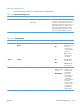
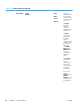
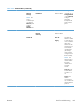
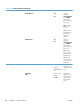
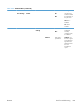
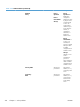


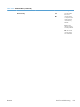
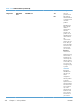

Table 3-29 Jetdirect Menu (continued)
First level Second level Third level Fourth level Fifth level Values Description
Manual
Settings
NOTE: This
menu is
available only if
you select the
Manual option
under the
Config
Method menu.
IP Address Enter the address (Available only if
Config Method
is set to Manual)
Configure
parameters
directly from the
product control
panel:
Subnet Mask Enter the address
Default
Gateway
Enter the address
Default IP Auto IP*
Legacy
Specify the IP
address to default
to when the print
server is unable to
obtain an IP
address from the
network during a
forced TCP/IP
reconfiguration
(for example,
when manually
configured to use
BootP or DHCP).
NOTE: This
feature assigns a
static IP address
that might
interfere with a
managed
network.
Auto IP: A link-
local IP address
169.254.x.x is
set.
Legacy: The
address
192.0.0.192 is
set, consistent with
older HP Jetdirect
products.
ENWW
Tools for troubleshooting
367