
user manual
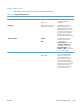
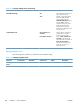

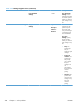
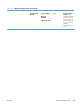
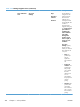


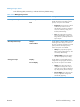
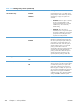

Table 3-26 Manage Supplies menu (continued)
First level Second level Third level Fourth level Values Description
Mostly Black
Pages
Select Mostly
Black Pages if the
majority of jobs that
you print are in black
& white. The product
uses monochrome
mode until it detects
a color page. The
product switches
back to monochrome
mode when it detects
a sequence of
several monochrome
pages. Using this
setting can increase
the time required to
print a job, but it
decreases wear on
the color print
cartridges.
Supply Messages Low Message On*
Off
Use the Supply
Messages menu to
configure whether a
message appears on
the control panel
when supplies are
getting low, but have
not yet reached the
low threshold.
Level Gauge On*
Off
Enable this feature to
determine whether or
not a supply level
gauge appears on
the control panel.
Reset Supplies New Fuser Kit No*
Yes
Use this menu to
notify the product
that a new supplies
kit has been
installed. These kits
include the transfer
kit, fuser kit,
maintenance kit, and
document feeder kit.
New Fuser Kit
Use this menu to
notify the product
that a new fuser kit
has been installed.
362 Chapter 3 Solve problems ENWW