
user manual
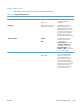
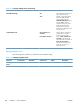

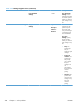
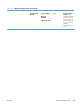
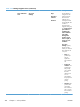


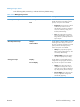
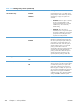

Table 3-26 Manage Supplies menu (continued)
First level Second level Third level Fourth level Values Description
Fuser Kit Very Low
Settings
Stop
Prompt to
continue*
Continue
Low Threshold
Settings
1-100%
Color/Black Mix Auto*Use this feature to
instruct the product
when to switch
between color and
monochrome printing
modes for the best
overall performance.
Select the setting
depending on the
types of jobs you
typically print
Select Auto to
instruct the product to
use the mode that is
appropriate for the
first page of the job.
If necessary, the
product switches
modes during the
middle of a job and
then stays in that
mode until the job is
finished. This is the
factory default
setting.
Mostly Color
Pages
Select Mostly
Color Pages if the
majority of jobs that
you print are in
color. The product
uses color mode for
all jobs, even if the
job contains no color
pages. Using this
setting can save
time, but it increases
wear on the color
print cartridges.
ENWW
Tools for troubleshooting
361