
user manual
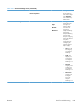
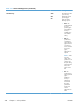

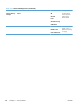
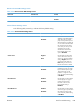
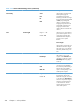
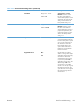
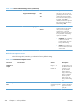
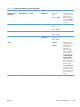


Table 3-24 Default Print Options menu (continued)
First level Second level Values Description
Default Custom
Paper Size
Unit of Measure Inches X Dimension Range: 2.99 –
12.28
Default = 12.28
Use the items in this
menu to configure the
default paper size
that is used when the
user selects Custom
as the paper size for
a print job.
Y Dimension Range: 5.00 –
18.50
Default = 18.5
MM X Dimension Range: 76 – 312
Default = 312
Y Dimension Range: 127 – 470
Default = 470
Sides 1-sided*
2-sided
Use this feature to
indicate whether the
original document is
printed on one or
both sides, and
whether the copies
should be printed on
one or both sides.
For example, select
1-sided original,
2-sided output
when the original is
printed on one side,
but you want to make
two-sided copies.
Select Orientation
to specify portrait or
landscape orientation
and to select the way
the second sides are
printed.
ENWW
Tools for troubleshooting
353