
user manual
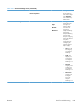
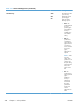

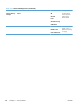
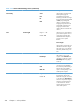
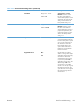
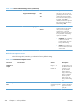


Table 3-23 General Print Settings menu (continued)
First level Second level Values Description
Font Pitch Range: 0.44 – 99.99
Default = 10
If Font Source and Font
Number indicate a contour
font, then use this feature to
select a default pitch (for a fixed-
spaced font). The range for this
setting is 0.44 to 99.99. The
factory default setting is 10.
Font Point Size Range: 4.00 – 999.75
Default = 12.00
If Font Source and Font
Number indicate a contour
font, then use this feature to
select a default point size (for a
proportional-spaced font). The
range for this setting is 4.00 to
999.75. The factory default
setting is 12.
Symbol Set Select from a list of symbol sets. Use this feature to select any one
of several available symbol sets
from the control panel. A symbol
set is a unique grouping of all
the characters in a font. The
factory default value for this
option is PC-8. Either PC-8 or
PC-850 are recommended for
line-draw characters.
Append CR to LF No*
Yes
Use this feature to configure
whether a carriage return (CR) is
appended to each line feed (LF)
encountered in backwards-
compatible PCL jobs (pure text,
no job control). Select Yes to
append the carriage return. The
default setting is No. Some
environments, such as UNIX,
indicate a new line by using only
the line-feed control code. This
option allows the user to append
the required carriage return to
each line feed.
ENWW
Tools for troubleshooting
351