
user manual
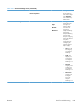
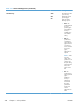

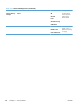
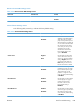
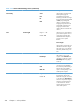
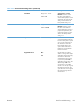
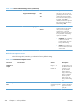
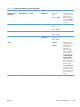


Table 3-21 General Settings menu (continued)
First level Second level Third level Fourth level Values Description
Auto Recovery Enable
Disable*
The product attempts
to reprint jammed
pages when sufficient
memory is available.
This is the default
setting.
Manage Stored
Jobs
Quick Copy Job
Storage Limit
1-300
Default = 32
Manage Stored
Jobs
Use this menu to
configure global
settings for jobs that
are stored in the
product memory.
Quick Copy Job
Storage Limit
Use this feature to
specify the number of
Quick Copy and
Proof and Hold jobs
that can be stored on
the product. The
maximum allowed
value is 100.
Quick Copy Job
Held Timeout
Off*
1 Hour
4 Hours
1 Day
1 Week
Use this feature to set
a maximum storage-
time limit for stored
Quick Copy and
Proof and Hold jobs.
If a stored job is not
printed during this
period, it is deleted.
Default Folder
Name
Type the name for
the stored jobs folder
that is accessible to
all users.
Sort Stored Jobs
By
Job Name*
Date
This option allows
you list the jobs either
Alphabetically or
Chronologically.
ENWW
Tools for troubleshooting
347