
user manual
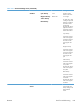
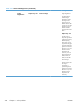
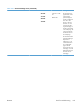


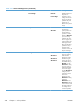
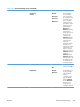
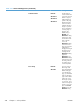

Table 3-21 General Settings menu (continued)
First level Second level Third level Fourth level Values Description
Resistance Mode Normal*
Up
Down
Use this setting to
correct print quality
problems in low-
humidity
environments and
highly resistive
paper. The default
setting is Normal.
Use the Up setting to
solve print quality
problems that are
related to poor toner-
transfer. Use the
Down setting in the
event that small, “pin-
hole” defects occur.
Humidity Mode Normal*
High
Use this setting to
correct print quality
problems in high-
humidity
environments. The
default setting is
Normal. Use the
High setting if you
are in a high-
humidity environment
and you are seeing
problems with low
toner density on the
first page of a job.
Pre-Rotation
Mode
Off*
On
Turn this feature on if
horizontal lines
appear on pages.
Using this feature
increases the first-
page-out time by a
few seconds.
ENWW
Tools for troubleshooting
339