
user manual
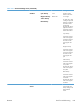
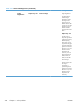
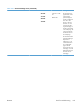
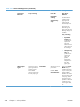


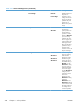
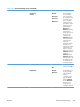
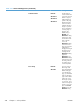

Table 3-21 General Settings menu (continued)
First level Second level Third level Fourth level Values Description
Shadows Cyan Density
Magenta Density
Yellow Density
Black Density
-5 to 5
Default = 0
Shadows are the
darkest color-values
in an image.
For each color, select
a setting to adjust the
darkness or lightness
of shadows on the
printed page.
Decrease the value to
lighten the shadows.
Increase the value to
darken the shadows.
Cyan Density
Increase the value to
make colors appear
more blue. Decrease
the value to make
colors appear less
blue.
Magenta Density
Increase the value to
make colors appear
more pink. Decrease
the value to make
colors appear less
pink.
Yellow Density
Increase the value to
make colors appear
more yellow.
Decrease the value to
make colors appear
less yellow.
Black Density
Increase the value to
make colors appear
more black.
Decrease the value to
make colors appear
less black.
Restore Color
Values
Use this feature to
restore all the color-
density settings to the
factory default
values.
ENWW
Tools for troubleshooting
335