
user manual




Administration menu
Reports menu
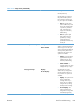
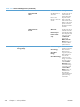
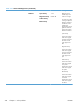
Table 3-20 Reports menu
First level Second level Description
Configuration/Status Pages Print Select the name of the report you want to
print.
Administration Menu Map Administration Menu Map: Shows a
map of the entire Administration menu
and the selected values for each setting.
Configuration Page Configuration Page: Shows the product
settings and installed accessories.
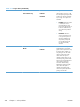
Supplies Status Page Supplies Status Page: Shows the
approximate remaining life for the supplies;
reports statistics on total number of pages
and jobs processed, serial number, page
counts, and maintenance information.
HP provides approximations of the
remaining life for the supplies as a customer
convenience. The actual remaining supply
levels might be different than the
approximations provided.
Usage Page Usage Page: Shows a count of all paper
sizes that have passed through the product;
lists whether they were simplex, duplex,
monochrome, or color; and reports the page
count.
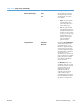
File Directory Page File Directory Page: Shows the file name
and folder name for files that are stored in
the product memory.
Current Settings Page Print a summary of the current settings for the
product. This might be helpful if you plan to
make changes and need a record of the
present configuration.
Color Usage Job Log The Color Usage Job Log page contains
information about the number of color and
black & white pages that each user has
printed. It also indicates from which software
program each of the jobs was printed.
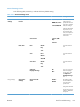
Other Pages Print
Demonstration Page Demonstration Page — Prints a
demonstration page.
RGB Samples RGB Samples — Prints color samples for
different RGB values. Use the samples as a
guide for matching printed colors.
ENWW
Tools for troubleshooting
329