
user manual
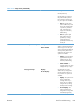
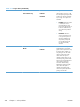
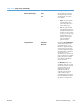


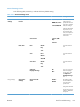
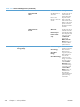

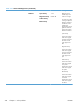

Table 3-19 Trays menu (continued)
First level Second level Values Description
Override A4/Letter Yes*
No
Use this feature to print on letter-
size paper when an A4 job is
sent but no A4-size paper is
loaded in the product (or to print
on A4 paper when a letter-size
job is sent but no letter-size
paper is loaded). This option will
also override A3 with ledger-size
paper and ledger with A3-size
paper. Select Yes to enable this
option. This is the factory default
setting. Select No to disable this
option.
Tray 1 Size Select from a provided list. Select the size of paper that is
loaded in the tray.
Tray 1 Type Select from a provided list. Select the type of paper that is
loaded in each tray.
Tray 2 Size Select from a provided list. Select the size of paper that is
loaded in the tray.
Tray 2 Type Select from a provided list. Select the type of paper that is
loaded in each tray.
Tray 3 Size Select from a provided list. Select the size of paper that is
loaded in the tray.
Tray 3 Type Select from a provided list. Select the type of paper that is
loaded in each tray.
328 Chapter 3 Solve problems ENWW