
user manual

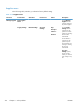
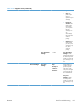

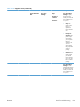
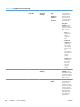
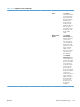
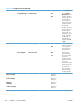
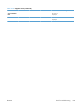


Table 3-18 Supplies menu (continued)
First level Second level Third level Fourth level Values Description
Supply Messages Low Message On*
Off
Use the Supply
Messages menu to
configure whether a
message appears on
the control panel
when supplies are
getting low, but have
not yet reached the
low threshold.
Configure whether a
message appears on
the control panel
when supplies are
getting low, but have
not yet reached the
low threshold. To
configure the Low
Message select On
or Off.
Level Gauge On*
Off
Enable this feature to
determine whether or
not a supply level
gauge appears on
the control panel.
Reset Supplies New Fuser Kit No*
Yes
Use this menu to
notify the product
that a new supplies
kit has been
installed. These kits
include the transfer
kit, fuser kit,
maintenance kit, and
document feeder kit.
Use this menu to
notify the product
that a new fuser kit
has been installed.
Black Cartridge The status is
displayed.
Cyan Cartridge The status is
displayed.
Magenta
Cartridge
The status is
displayed.
Yellow Cartridge The status is
displayed.
322 Chapter 3 Solve problems ENWW