
user manual

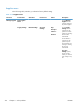
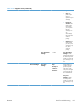

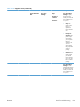
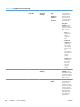
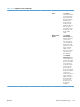
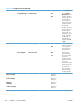
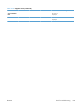


Table 3-18 Supplies menu (continued)
First level Second level Third level Fourth level Values Description
Fuser Kit Very Low
Settings
Stop
Prompt to
continue*
Continue
Use this feature to
configure how the
product responds
when the fuser is
reaching the end of
its estimated life.
Very Low
Settings: Specify
how the product
notifies you when the
fuser is very low.
●
Stop: The
product stops
until you
replace the
fuser.
●
Prompt to
continue: The
product stops
and prompts
you to replace
the fuser. You
can
acknowledge
the prompt and
continue
printing.
●
Continue: The
product alerts
you that the
fuser is very
low, but it
continues
printing.
Low Threshold
Settings
1-100% Low Threshold
Settings: Set the
estimated percentage
at which the product
notifies you when the
fuser is very low.
Color/Black Mix Mostly Black
Pages
Use this feature to
instruct the product
when to switch
between color and
monochrome printing
modes for the best
overall performance.
Select the setting
depending on the
types of jobs you
typically print.
320 Chapter 3 Solve problems ENWW