
user manual

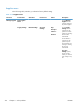
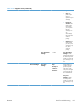

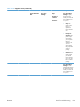
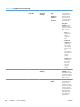
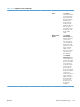
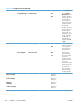


Table 3-18 Supplies menu (continued)
First level Second level Third level Fourth level Values Description
●
Stop: The
product stops
until you
replace the print
cartridge.
●
Prompt to
continue: The
product stops
and prompts
you to replace
the print
cartridge. You
can
acknowledge
the prompt and
continue
printing.
●
Continue: The
product alerts
you that a print
cartridge is very
low, but it
continues
printing.
Low Threshold
Settings
1-100% Low Threshold
Settings: Set the
estimated percentage
at which the product
notifies you when the
print cartridge is very
low.
Color Cartridges Very Low
Settings
Stop
Prompt to
continue*
Continue
Use this feature to
configure how the
product responds
when each of the
color print cartridges
is reaching the end
of its estimated life.
Very Low
Settings: Specify
how the product
notifies you when the
print cartridge is very
low.
ENWW
Tools for troubleshooting
317