
user manual

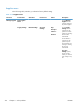



Supplies menu
In the following table, asterisks (*) indicate the factory default setting.
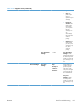
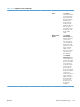
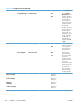
Table 3-18 Supplies menu
First level Second level Third level Fourth level Values Description
Manage Supplies Print Supplies
Status
Use the Manage
Supplies menu to
configure settings for
the product supplies.
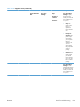
Supply Settings Black Cartridge Very Low
Settings
Stop
Prompt to
continue*
Continue
Use the Supply
Settings menu to
configure how the
product reacts when
supplies are reaching
the end of their
estimated life.
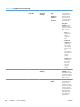
Use this feature to
configure how the
product responds
when the black print
cartridge is reaching
the end of its
estimated life.
Very Low
Settings: Specify
how the product
notifies you when the
print cartridge is very
low.
316 Chapter 3 Solve problems ENWW