
user manual

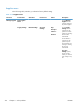
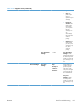

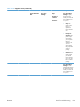
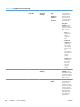
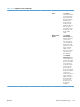
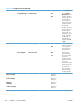


Table 3-17 Retrieve Job From Device Memory menu (continued)
First level Second level Third level Fourth level Fifth level Values Description
All Jobs (No
PIN)
NOTE: Individual
job names also
appear.
Print Copies Range: 1 –
9999
Default = 1
Job without
PIN — Menu
options include:
Print: Select this
option to print a
job without a
PIN. In the
Copies field,
select the
number of
copies to print.
Print and
Delete
Copies Range: 1 –
9999
Default = 1
Print and
Delete: Select
this option to
print and then
delete a job
without a PIN. In
the Copies
field, select the
number of
copies to print.
Delete Delete All
Jobs
Yes
No
Delete: Select
this option to
delete a job
without a PIN.
ENWW
Tools for troubleshooting
315