
user manual




NOTE: When the initialization process completes the connectivity LED should be illuminated solid
green—the LED is off if the product is in Sleep mode
If after initialization the connectivity LED is not solid green, see
Connectivity LED, product operating
on page 252.
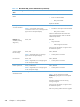
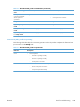
Table 3-4 Connectivity LED, product initialization
Product initializing
state
Connectivity LED, normal state Connectivity LED, error state
No power (power cord
unplugged or power
button off)
Off Not applicable
Power on (immediately
after the power button
pressed)
Red, solid
●
Duration should be 1 second or less
Red, solid
●
Firmware error; problem finding hardware
and booting the serial peripheral interface
flash memory
◦
Boot process halted
Replace the formatter.
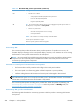
Serial peripheral
interface (SPI) flash
memory boot
Green, solid Red, solid
●
Firmware error; problem corrupt or missing
SPI flash memory
◦
Boot process halted
Replace the formatter.
HW checks on board
DRAM
Green, solid Red, solid
●
Power on self check failure
◦
Boot process halted
Replace the formatter.
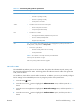
Control panel
connection initializes
Green, solid
NOTE: Control panel communication
successful. If an error occurs, a message should
appear on the control-panel display.
Yellow, fast flash
●
Formatter to control panel connection failed
◦
Boot process continues
Check the cables between the formatter and
control panel for damage. Make sure that the
cables are fully seated.
Preboot menu
available (including
diagnostics)
Green, solid Red, solid
●
Diagnostic failure
◦
Follow diagnostic instructions
Turn the power off, and then on again to restart
the initialization process.
ENWW
Tools for troubleshooting
251