
user manual


Laser/scanner assembly (Y/M)
Before proceeding, remove the following components:
●
Toner collection unit. See
Toner collection unit on page 79.
●
Formatter. See
Formatter PCA on page 81.
●
Right rear cover. See
Right rear cover on page 109.
●
Left cover. See
Left cover on page 111.
●
Rear cover and upper rear cover. See
Rear cover and upper rear cover on page 124.
NOTE: It is not necessary to separate the upper rear cover from the rear cover to remove the
laser/scanner assembly (Y/M).
●
Interconnect board (ICB). See
Interconnect board (ICB) on page 158.
●
Low voltage power supply. See
Low voltage power supply on page 163.
●
High voltage power supply lower. See
High voltage power supply lower (HVPS-D) on page 167.
Remove the laser/scanner assembly (Y/M)
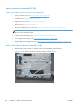
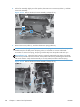
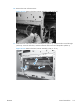
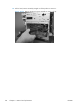
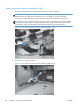
1. Remove five screws (callout 1), and then remove the sheet-metal plate (callout 2).
Figure 2-166 Remove the laser/scanner assembly (Y/M) (1 of 12)
1
2
186 Chapter 2 Removal and replacement ENWW