
user manual



Left cover
Before proceeding, remove the following components:
●
Formatter PCA. See
Formatter PCA on page 81.
●
Toner collection unit. See
Toner collection unit on page 79.
Remove the left cover
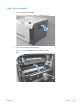
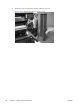
1. Remove four screws (callout 1).
Figure 2-58 Remove the left cover (1 of 4)
1
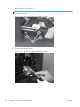
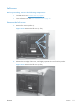
2. Release the rear edge of the cover, and slightly separate the cover from the product.
Figure 2-59 Remove the left cover (2 of 4)
ENWW
Covers
111