
user manual
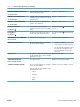
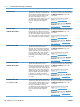
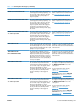

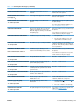



Event log messages
This section describes messages that only appear in the event log. For additional numeric messages,
see the control-panel message section in this manual. See
Control-panel messages on page 345.
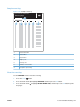
Print an event log
Use the event log to help diagnose and solve product problems.
1. Press the Home
button.
2. Press the down arrow
to highlight DIAGNOSTICS, and then press the OK button.
3. Press the down arrow
to highlight PRINT EVENT LOG, and then press the OK button to print
the pages.
Show an event log
Use the control panel to view the event log.
1. Press the Home
button.
2. Press the down arrow
to highlight DIAGNOSTICS, and then press the OK button.
3. Press the down arrow
to highlight SHOW EVENT LOG, and then press the OK button to print
the pages.
376 Chapter 3 Solve problems ENWW