
user manual

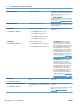



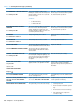


Description Recommended action
59.F0 ERROR Transfer alienation failure 1. Verify that the ITB is installed.
2. Reconnect the primary-transfer
disengagement sensor J19, and
connector J128 on the DC controller
PCA .
3. Run the sensor test in the sensor
monitor mode to verify that the primary
transfer disengagement sensor is
functioning properly. If not, replace the
primary transfer disengagement sensor.
4. Perform the alienation drive component
test in the DIAGNOSTICS menu. If not,
replace the fuser motor. See
Fuser
motor on page 200.
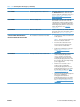
60.02 ERROR Tray 2 is not lifting correctly. 1. Reconnect connector J115 on the DC
controller PCA and the intermediate
connector J58.
2. Run the sensor test in sensor monitor
mode to verify that the cassette media
stack surface sensor is functioning
properly. If it is not, replace the pickup
assembly. See
Tray-pickup drive
assembly on page 178.
3. Reconnect connector J56 of the lifter
motor. Also check J107 on the DC
controller PCA.
4. If the message persists, replace the lifter
drive assembly. See
Lifter-drive
assembly on page 173.
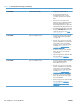
60.03 ERROR Tray 3 is not lifting correctly. 1. Reconnect connector J408 on the paper
deck controller PCA and the
intermediate connector J11.
2. Run the sensor test in sensor monitor
mode to verify that the cassette media
stack surface sensor is functioning
properly. If it is not, replace the pickup
assembly. See
Pickup assembly
(optional paper feeder) on page 226.
3. Reconnect connector J15 of the lifter
motor. Also check J407 on the paper
deck controller PCA.
4. If the message persists, replace the lifter
drive assembly. See
Lifter-drive
assembly (optional paper feeder)
on page 230.
Table 3-14 Control-panel messages (continued)
354 Chapter 3 Solve problems ENWW