
user manual


Item Sub-item Sub-item Sub-item Description
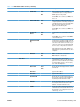
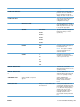
PRINT RESULTS YES
NO*
If the ping test was not set for continuous
operation, you can choose to print the test
results. Select YES to print results. If you
select NO, results are not printed.
EXECUTE YES
NO*
Specify whether to initiate the ping test.
Select YES to initiate the test, or NO to not
run the test.
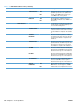
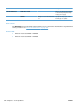
PING RESULTS Use this item to view the ping test status and
results using the control panel display. You
can select the following items:
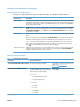
PACKETS SENT Shows the number of packets (0 - 65535)
sent to the remote host since the most recent
test was initiated or completed. The default is
0.
PACKETS
RECEIVED
Shows the number of packets (0 - 65535)
received from the remote host since the most
recent test was initiated or completed. The
default is 0.
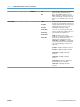
PERCENT LOST Shows the percent (0 to 100) of ping test
packets that were sent with no response from
the remote host since the most recent test
was initiated or completed. The default is 0.
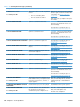
RTT MIN Shows the minimum detected roundtrip-time
(RTT), from 0 to 4096 milliseconds, for packet
transmission and response. The default is 0.
RTT MAX Shows the maximum detected roundtrip-time
(RTT), from 0 to 4096 milliseconds, for packet
transmission and response. The default is 0.
RTT AVERAGE Shows the average round-trip-time (RTT),
from 0 to 4096 milliseconds, for packet
transmission and response. The default is 0.
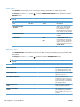
PING IN
PROGRESS
YES
NO*
Shows whether a ping test is in progress.
YES indicates a test in progress, and NO
indicates that a test completed or was not run.
Table 3-13 Embedded Jetdirect menu (continued)
340 Chapter 3 Solve problems ENWW