
user manual





Item Sub-item Sub-item Values Description
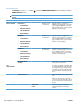
ADJUST PAPER
TYPES
A list of paper types
displays.
PRINT MODE
RESISTANCE
MODE
HUMIDITY MODE
PRE-ROTATION
MODE
FUSER TEMP
MODE
PAPER CURL
MODE
A list of print modes
displays.
Configure the print mode that is
associated with each media type.
RESTORE MODES Use this feature to return all paper type-
mode settings to the factory-default
settings.
OPTIMIZE A list of available options
displays.
Allows you to optimize various print modes
to address print quality issues.
RESTORE OPTIMIZE Use this feature to return all the settings in
the OPTIMIZE menu to the factory-default
values.
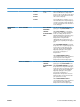
QUICK CALIBRATE
NOW
Performs a partial product calibration.
FULL CALIBRATE
NOW
Performs all product calibrations.
DELAY
CALIBRATION AT
WAKE/POWER-ON
NO
YES*
This menu controls the timing of the
calibration when the product wakes up or
is turned on.
●
Select NO to have the product
calibrate immediately when it wakes
up or is turned on. The product will
not print any jobs until it finishes
calibrating.
●
Select YES to enable a product that
is asleep to accept print jobs before it
calibrates. It may start calibrating
before it has printed all the jobs it has
received. This option allows quicker
printing when coming out of sleep
mode or when you turn the product
on, but print quality might be reduced.
NOTE: For best results, allow the
product to calibrate before printing. Print
jobs performed before calibration might
not be of the highest quality.
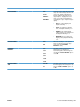
RESOLUTION Image REt 3600*
1200x1200 dpi
Sets the resolution at which the product
prints. The default value is Image REt
3600. Try the 1200x1200 dpi setting to
improve printing for detailed line work or
small text.
326 Chapter 3 Solve problems ENWW