
user manual





PCL sub-menu
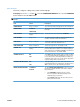
This menu configures settings for the printer control language.
To display: Press the Home button
, select the CONFIGURE DEVICE menu, select the PRINTING
menu, and then select the PCL menu.
NOTE: Values that have an asterisk (*) are the factory-default values. Some menu items have no
default.
Item Values Description
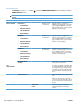
FORM LENGTH Range: 5-128 lines Sets vertical spacing for default paper size. The default is 60.
ORIENTATION PORTRAIT*
LANDSCAPE
Allows you to set the default page orientation to portrait or
landscape.
FONT SOURCE A list of available font sources
displays.
Selects the font source. The default is INTERNAL.
FONT NUMBER Range: 0-102 The product assigns a number to each font and lists the
numbers on the PCL font list. The default is 0.
FONT PITCH Range: 0.44-99.99 Selects the font pitch. This item might not appear, depending
on the font selected. The default is 10.00.
FONT POINT SIZE Range: 4.00-999.75 Selects the font point size. The default is 12.00.
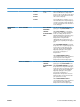
SYMBOL SET A list of available symbol sets
displays.
Selects any one of several available symbol sets at the
product control panel. A symbol set is a unique grouping of
all the characters in a font. PC-8 or PC-850 is recommended
for line-draw characters. The default is PC-8.
APPEND CR TO LF NO*
YES
Select YES to append a carriage return to each line-feed that
is encountered in backward-compatible PCL jobs (pure text,
no job control). Some environments indicate a new line by
only the line-feed control code. Use this option to append the
required carriage return to each line feed.
SUPPRESS BLANK PAGES NO*
YES
When generating your own PCL, extra form feeds are
included that would cause a blank page to be printed. Select
YES for form feeds to be ignored if the page is blank.
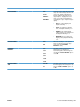
MEDIA SOURCE MAPPING STANDARD*
CLASSIC
The PCL5 MEDIA SOURCE MAPPING command selects an
input tray by a number that maps to the various available
trays and feeders.
●
The STANDARD numbering is based on newer
HP LaserJet printers with updated changes to the
numbering of trays and feeders.
●
The CLASSIC numbering is based on HP LaserJet 4
printers and earlier models.
ENWW Tools for troubleshooting 323