
user manual



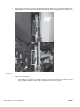

Q Tray 2 paper surface 1 and 2 sensors
1. Remove the tray.
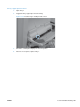
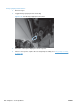
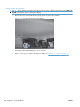
2. In the tray cavity, press the tray-closed tab to release the flag, and then toggle the flag.
Figure 3-21 Tray 2 paper surface 1 and 2
3. Check the control-panel display for sensor response.
4. If there is no response, replace the cassette-pickup assembly. See
Tray-pickup assembly
on page 180.
ENWW Tools for troubleshooting 263