
user manual





10 Front-panel error messages
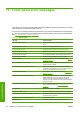
Occasionally you may see one of the following messages appear on the front-panel display. If so, please
follow the advice in the Recommendation column.
If you see an error message that does not appear here, and you feel in doubt about the correct response,
or if you have followed the recommendation but the problem persists, call your service representative.
See
HP Customer Care Centers on page 49.
Table 10-1 Text messages
Message Recommendation
{Color} cartridge is altered You are advised to replace the ink cartridge. See the User's
guide.
{Color} cartridge is low on ink Be ready to replace the ink cartridge soon.
{Color} cartridge is missing Install the correct ink cartridge. See the User's guide.
{Color} cartridge is out of ink Replace the ink cartridge. See the User's guide.
{Color} cartridge has expired You are advised to replace the ink cartridge. See the User's .
{Color} printhead is missing Install the correct printhead. See the User's guide.
Alignment pending You are advised to perform printhead alignment. See Align the
printheads on page 6.
A wrong printhead has been detected Check that the correct printheads and the latest firmware
release have been installed.
An error has occurred in printhead detection Remove the printhead, clean any ink from the electrical
connectors on the printhead (do not try to clean the nozzles),
and reinsert the printhead. See the User's guide.
Clean drop detector spittoon You are advised to clean the ink deposits. See Clean the ink
deposits on page 15.
Cleaner roll jam. Check cleaner roll module. Go to the front panel and select the Ink System menu, then
Check cleaner roll. Pull out the printhead cleaning roll
assembly, raise the pinchwheels, wind the roll forward
manually, then lower the pinchwheels and push the assembly
back into the printer.
Color calibration cancelled because of scanning errors The color calibration chart could not be scanned successfully
with the current substrate. See
Color calibration fails
on page 43.
Disconnected Check the connection to the printer.
Ink system not ready to print Please wait a while. If the printer does not recover, restart it.
Job canceled due to lack of data received from the IPS If the problem persists, check the configuration of the HP
Internal Print Server computer.
Line sensor calib. error: substrate too small Load a larger substrate.
Low cleaner roll Be ready to replace the printhead cleaning roll soon.
44 Chapter 10 Front-panel error messages ENWW
Front-panel errors