
user manual



4 Hardware maintenance
Maintain the ink cartridges
During the normal lifetime of a cartridge, no specific maintenance is required. However, in order to
maintain the best print quality, replace a cartridge when it reaches its expiration date. An alert notifies
you when any cartridge reaches its expiration date.
You can also check a cartridge's expiration date at any time: see
Check printer status on page 5.
Maintain the printheads
During the normal lifetime of a printhead, no regular maintenance is required. However, in order to
maintain the best print quality, replace a printhead when it reaches its expiration date. An alert notifies
you when any printhead reaches its expiration date.
You can also check a printhead's expiration date at any time: see
Check printer status on page 5.
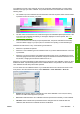
Printheads may need to be cleaned and aligned from time to time: see
Clean the printheads
on page 18 and Align the printheads on page 6.
To check the printheads for blocked nozzles, see
Check the printheads on page 12.
TIP: If you remove an unexpired printhead from the printer, planning to reuse it later, the best way to
protect it is by replacing the protective caps that you removed before inserting it into the printer.
Maintain the substrates
Keep substrates in their sealed wrapping material while they are in storage, and store rolls vertically to
avoid the migration of plasticizers in some materials.
Move substrates from the storage area to the print production area at least 24 hours before use, so that
they can adapt to its temperature and humidity.
ENWW Maintain the ink cartridges 11
Hardware maintenance