
User's Manual


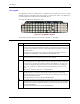


Table Of Contents
- Notices
- Revision Notice
- Table of Contents
- Illustrations
- Introduction
- Overview
- Laser Warnings and Labels
- Components
- Quick Start
- About Lithium-Ion Batteries
- RFID Introduction
- Insert Main Battery
- Attach Handstrap (Optional)
- Attach the Stylus Clip (Optional)
- Attach to Hip-Flip (Optional)
- Connect External Power Supply (Optional)
- Connect Audio Jack (Optional)
- Power Button
- Tapping the Touchscreen with a Stylus
- Touchscreen
- Set The Audio Speaker Volume
- Enter Data
- Getting Help
- The MX3X Hand Held Computer
- Key Maps
- Regulatory Notices and Safety Information
- Index

The Keypad 33
LED Functions
Figure 28 LED Functions
Across the top of the keypad are LEDs that provide visual cues to current computer operation.
When the LED is not illuminated, the function is inactive.
LED When illuminated ...
2nd
The next keypress is a 2
nd
keypress.
• Amber when on
• Blinks amber during configuration key sequence.
ALT
The next keypress is an ALT keypress.
• Amber when on and unlit when off.
CTRL
The next keypress is a CTRL keypress.
• Amber when on and unlit when off.
SHFT
The next letter is the uppercase letter on alpha keys and the shifted character on the
numeric keypad keys.
• Amber when on and unlit when off.
CAPS
Uppercase letters are active until the CAPS key sequence is pressed again.
• Amber when on and unlit when off.
SCNR
Barcode scanner function, affected by both tethered scanners and the scanner
endcap.
• Red - scanning.
• Green - good scan.
• Unlit - scanner is inactive.
BATT
B
Backup Battery. When illuminated, the backup battery is charging. When unlit, the
backup battery is not charging
STAT
Status Indicator.
• Amber – device is booting up.
• Blinking Green when display Suspend state begins.
BATT
M
Main Battery. When illuminated, main battery capacity is low.
• Red – low battery.
• Blinking Red – power fail.
• Unlit - Main battery is not low OR all charge is depleted in both batteries..
CHGR
Charger. When on, the mobile device is receiving external power either from the DC
power jack or the MX3X is seated in a powered cradle.
• Red - Main battery is charging.
• Amber – Fault or temporary standby (Contact LXE Customer Support).
• Green - battery charge is complete and the mobile device is connected to
external power through the power jack or a powered cradle.
E-EQ-MX3XOGWW-C MX3X User’s Guide