
User's Manual


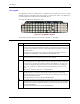


Table Of Contents
- Notices
- Revision Notice
- Table of Contents
- Illustrations
- Introduction
- Overview
- Laser Warnings and Labels
- Components
- Quick Start
- About Lithium-Ion Batteries
- RFID Introduction
- Insert Main Battery
- Attach Handstrap (Optional)
- Attach the Stylus Clip (Optional)
- Attach to Hip-Flip (Optional)
- Connect External Power Supply (Optional)
- Connect Audio Jack (Optional)
- Power Button
- Tapping the Touchscreen with a Stylus
- Touchscreen
- Set The Audio Speaker Volume
- Enter Data
- Getting Help
- The MX3X Hand Held Computer
- Key Maps
- Regulatory Notices and Safety Information
- Index

30 Endcaps and COM Ports
IR Port
Figure 26 IR Port (COM 2)
The InfraRed (IR) port provides a means of transferring information to a device with a similar port
and the proper software. The IR port can be used to communicate with printers or a host computer
with the use of an adapter. The IR Port is specified as COM 2 and is a bi-directional half-duplex
infrared port. It supports the Slow IrDA (Infrared Data Access) PHY Layer standard that allows
communication speeds up to 115k baud.
When sending data through the IR port to another MX3X's IR port, make sure both units are in
close proximity to each other. The IR operating envelope has a distance range of 2 cm (.79 inches)
to 1 meter (3.2 feet) with a viewing angle of 30 degrees.
See the "MX3X Reference Guide" for complete instructions when sending data through the IR
port.
Note: ActiveSync will transfer files over the RS-232 connector on the cradle. The cradle
performs a “file pass through” to the IR port on the back of the MX3X.
MX3X User’s Guide E-EQ-MX3XOGWW-C