
User's Manual


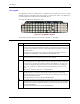


Table Of Contents
- Notices
- Revision Notice
- Table of Contents
- Illustrations
- Introduction
- Overview
- Laser Warnings and Labels
- Components
- Quick Start
- About Lithium-Ion Batteries
- RFID Introduction
- Insert Main Battery
- Attach Handstrap (Optional)
- Attach the Stylus Clip (Optional)
- Attach to Hip-Flip (Optional)
- Connect External Power Supply (Optional)
- Connect Audio Jack (Optional)
- Power Button
- Tapping the Touchscreen with a Stylus
- Touchscreen
- Set The Audio Speaker Volume
- Enter Data
- Getting Help
- The MX3X Hand Held Computer
- Key Maps
- Regulatory Notices and Safety Information
- Index

Touchscreen Display 27
Scan Buttons
Figure 23 Programmable Buttons
There are two buttons, one on each side of the display. The buttons can be programmed to perform
specific functions. The programmable keys have no effect on barcode scanners tethered to the
device. When there is no integrated scanner installed, both buttons default to Enter buttons (with
the exception of IBM 5250 terminal emulation devices – in this case, the left button is labelled and
functions as “Field Exit”).
Note: The programmable Scan key is the Field Exit key when the MX3X is an IBM 5250 /
TN5250 compatible device. It can also be programmed as the RFID Read key for an
MX3-RFID device.
To edit the button parameters, select Start | Settings | Control Panel | Scanner. Change the
parameter values and tap OK to save the changes.
The default setting for the right button is Enter. The default setting for the left button is Scan.
When the device does not have an integrated scanner, both buttons default to Enter keys and the
Scan selection is greyed out.
Each button can be setup as:
• Disabled – no response when pressed
• Scan – initiate a barcode scan sequence (integrated scanner only)
• Enter Key
• Tab Key
• Field Exit (IBM 5250 / TN5250 devices only)
• Virtual Key (default values F20 and F21)
• RFID Read
Field Exit Key Function (IBM 5250/TN5250 Only)
The Field Exit key is used to exit an input field. If the field is an Auto Enter field, the
auto transmit function is activated. This key function is present on the IBM
5250/TN5250 specific keypad only.
Scan Buttons and the SCNR LED
The SCNR LED, located above the keypad, illuminates during an integrated barcode scanner
function. It is affected by internal scanner algorithms.
• Red - scanning.
• Green - good scan.
• Unlit – laser scanner is inactive.
The Scan buttons have no effect on tethered barcode scanners connected to a serial port. Tethered
scanners read barcode scans only when the trigger on the tethered scanner is pressed. Pressing the
trigger on the tethered scanner has no effect on the device’s Scan buttons.
Note: Refer to the “MX3X Reference Guide” before programming the Scan / Enter buttons. The
Reference Guide also contains instructions for the Key Map Utility for the keypad.
E-EQ-MX3XOGWW-C MX3X User’s Guide